
Home Page › Forums › Rock Class 101 Ukulele Lessons › Test Drive Our NEW Search & Filter Functionality!
- This topic has 30 replies, 9 voices, and was last updated 1 year ago by
 Andrew.
-
AuthorPosts
-
September 21, 2025 at 7:59 pm #76088
 AndrewKeymaster
The AND/OR logic is confusing. Think of it this way instead.
Method 1: If I want to find a specific result, it’s best to select one tag per category. For ex, if I’m a beginner and I want to work on strumming the blues, but I only have a High G, I’d select those 4 tags:
Difficulty: Beginner Series
Tuning: High G
Genre: Blues
Playing Style: StrummingThis results in 3 songs being shown.
Method 2: But if you want a broader result, like the method outlined above, that example yielded 26 songs being shown.
To narrow it down, you’d have to continue selecting additonal tag(s). For ex, if I add one more tag: “Summer” from the Seasonal Category, that narrows the results down to 3 songs.
September 21, 2025 at 9:00 pm #76089 leb397Participant
@andrew I love this option and path to a better result. Great addition. Thanks for the upgrades a easy explanationn.
P.S. huge thank you in sharing my take on House of Rising Sun in weekly lesson. Very flattered ☺️ Louisa
September 21, 2025 at 9:36 pm #76092September 22, 2025 at 3:01 pm #76103September 22, 2025 at 11:09 pm #76108 grannieannieParticipant
The site is definitely faster, @Andrew, and I really like the new sorting capabilities. One suggestion: it would be easier to navigate if every link opened in a separate window. I spend a lot of time going through previous screens, to get back to where I started.
Thanks for all the time you’ve put into redoing the website – and I hope you took some time off over the summer.
September 23, 2025 at 12:19 am #76112AndrewKeymaster@janaq1 – My pleasure and TY again!
@grannieannie – TY Annie! To be honest, I don’t think that’s something we’ll change. But the easiest way to do it is to right-click the link and select “Open link in new tab.” If you’re on a tablet or phone, press and hold the link until a pop-up menu appears, then choose “Open in new tab.”September 23, 2025 at 2:59 am #76113grannieannieParticipantThanks, @Andrew – I didn’t know we could do that.
September 23, 2025 at 8:41 pm #76125AndrewKeymasterHi guys, today we replaced the old search & filtering functionality with the new one! There’s still a few minor things we need to address, but overall it’s working great! If you spot any bugs or issues, please let me know. 🙂
September 24, 2025 at 6:23 am #76128 marianneParticipant
Rachael, if this helps, the ‘AND’ condition means the resulting songs have to meet ALL criteria (narrower return of options) vs the ‘OR’ condition that means the resulting songs have to meet EITHER/ANY of the criteria selected.
Andrew, great progress on the styling changes and the filtering logic/functioning! I did notice something though while testing it out. As per the attached, under ‘Ukulele Songs’, I selected for instance Level 4 songs (52) from the ‘Difficulty’ set. The changes to the 2 following sets (and beyond) should total up to 52, but I am seeing more: Ukulele Tuning: 49 + 4 = 53 and Arrangement Type: 39 + 4 + 7 + 8 = 58 (etc.) Shouldn’t they all come to a total of 52?
Thanks! Exciting times 🙂
September 24, 2025 at 1:43 pm #76133leb397Participant@Andrew not sure this is an option or maybe there is an easier way…. I have 3 long pages of favorite songs in my saved. Usually I’m working on the last song, page 3. Can we have option of selecting page we want at the top of the lists? Hope that’s explained clearly or what other options are there. Louisa
-
This reply was modified 1 year ago by
 leb397.
September 24, 2025 at 7:56 pm #76137 nat-ukeParticipant
So many things to like. Perhaps my fav is being able to sort for newest items first.
September 24, 2025 at 8:40 pm #76140AndrewKeymaster@marianne – That is happening because some songs double dip within the same category. So in your example, when selecting:
Difficulty Level: Level 4
That populates 52 songs.
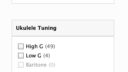
The category below (Ukulele Tuning) updates and shows:
High G (49)
Low G (4)
Baritone (0)That adds up to 53. So who is the odd man out? Or should I say, the double dipper, lol? It’s this song:

Funny enough, I wrote the description for that lesson which shows the double dipping: Four of the songs are listed in three levels, and for tuning, it’s listed in both high and low G.
So what happens when you select:
Does it show 53 or 52? It shows the correct amount of level 4 songs, which is 52.
The same logic applies for the next category. Arrangement type shows:
Solo (39)
Duet (7)
Trio (4)
Full Band (8)Which adds up to 58, but if we select:
Level 4 + the 4 tags above, we end up with the correct amount: 52.
TY for the kind words!
@leb397 – I think the easiest thing to do is to create a new collection called “Current Songs” and then move them back to the original collection when you don’t need instant access anymore. Creating collections is covered in the video below starting at 2:15.
@nat-uke – 🙂October 1, 2025 at 3:46 pm #76183AndrewKeymasterJust a heads up for folks using the site today: we’re in the process of removing the old Search & Filter software, and something went a little sideways. As a result, the new search pages aren’t displaying quite right, but they are fully functional. This will be fixed tomorrow, my apologies for the inconvenience.
October 1, 2025 at 4:04 pm #76184leb397Participant@andrew love the “create my own collection “. Saves a lot of time making my own favorites 👍👏
October 2, 2025 at 6:42 pm #76192AndrewKeymasterJust a heads up for folks using the site today: we’re in the process of removing the old Search & Filter software, and something went a little sideways. As a result, the new search pages aren’t displaying quite right, but they are fully functional. This will be fixed tomorrow, my apologies for the inconvenience.
Update: Our developer had a family emergence today. The visual issues will be fixed tomorrow afternoon before we release our new lesson, which is gonna be epic! 🙂
-
This reply was modified 1 year ago by
-
AuthorPosts

- You must be logged in to reply to this topic.