Forum Replies Created
-
AuthorPosts
-
 sir_anzalotMember
Don’t worry about it 🙂
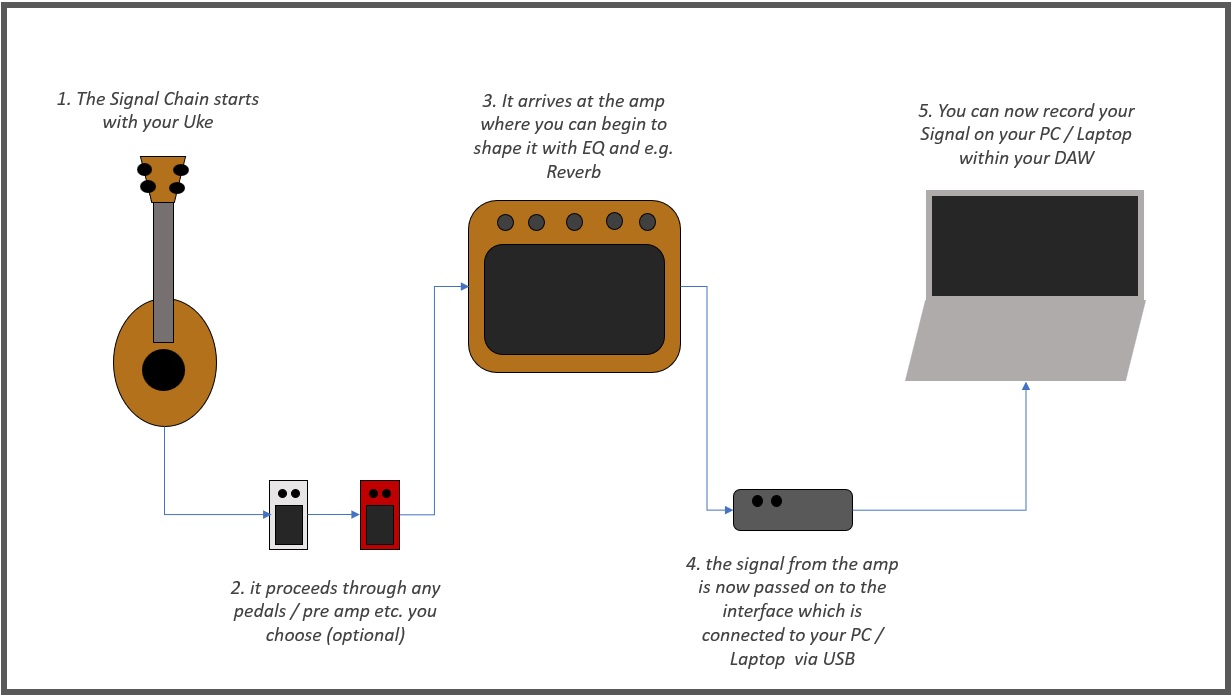
If anything, the interface is what you should consider “a hub” in your signal chain. It’s the device which transaltes the analog audio signal you produce with your Uke and additional gear and translates it to a digital one a computer can understand and work with.
I threw together a little Flowchart for you which I attached to this reply. This will hopefully clear out any confusion. You are free to feel amused by my highly professional work on this by the way =D
Please note that you can skip the amp part of this entirley should you want to and plug yourself directly into the interface. I don’t do it that way though because I like to use the amp as my first instance for EQ shaping and stuff and also like to hear what the signal I’m going to end up recording will sound like without wearing headphones. Pro tip in regards to Reverb at this point: Some is okay but less is always almost more here.
If you need further instruction or help on anything (especially when you start recording that way) don’t hesitate to ask.
Attachments:
sir_anzalotMemberHey @surferjay 🙂
The loudbox mini is the Amp I want to upgrade to in time as well. When I got my initial setup together I couldn’t afford anything in that league and I settled for a more affordable option with similar features but a bit less quality. I did get a fishman Platinum Pro EQ Pre-Amp in the meantime though and that already really did something for the quality of my sound. I still have multiple steps planned out to level up my gear over the next 6 to 10 months though. But let me get back to the point.
For quality home recordings there are multiple things to consider. The first big category is the necessary gear and the second one would be a software (DAW or Digital Audio Workstation) to record and post-process the audio you record. This takes care of the audio portion of it all but you’ll also likely need a video editor to wrap up your audio & video into one neat package. I’ll go through everything necessary step by step.1. The Audio Interface
As you already got a Uke you can hookup to an Amp (and quite a good one for home recordings for that matter), you don’t have much more to worry about in the gear department than the interface. As of now I am still using the Behringer U-Phoria UM2 (about 45$) which does the job and is inexpensive. If you have just a bit more monetary flexibility I do recommend to go another way on that one and that is the Focusrite Scarlett Solo 3rd Gen (about 120$). This not only is built sturdier and has a much better sample rate than the Behringer, but also comes bundled with Ableton Lite (I’ll get to that in a minute) and a ton of Audio Editing Software Plugins for you to use. The Scarlett is a very popular interface (gold standard for home recording musicians from what I gathered) and also the one I’m going to upgrade to. Both Interfaces give you the same connection options for two channels and support Phantom Power supply, which is needed for many professional mics. Might not seem necessary to you now but at least I am already toying with the idea of simultaneously recording my Amp signal and the acoustic signal of the Uke over a mic at the same time for stereo options and thicker tracks 😉2. The Audio Software
This is the much bigger part of the equation and something that cannot be avoided if you truly want to surpass phone recording audio quality. Please note that everything I say in this part is purely from a standpoint of Windows user by the way. Apple also has their stuff in the software department like Garage Band, but I don’t have any experience with that nor have I looked into it too much so I cannot really offer any assistance there. Anyway let’s go.As already mentioned by Andrew and by me earlier in this post you’ll need a DAW. Up until now everything I did after leaving my phone behind for audio recording purposes was done in Audacity. Audacity isn’t technically a full fledged DAW but more of a very useful and relatively easy to grasp Audio Editor equipped with everything you need to start out with home recordings. It is also open source and thus free, which ist he main reason I started working with it. Your DAW will not only enable you to record your signal in an uncompressed or otherwise altered form, it will also hand you the tools you need for post-processing / mixing.
A much better alternative for post production would be Ableton Lite. This is the one which also comes bundled with previously mentioned Focusrite Interface. I have no firsthand experience with it yet but have already seen it do great things (or rather being done with it) and this is what I’m going to use as soon as I upgrade my interface as well. Ableton is a very powerful tool with a supposedly steep learning curve at the beginning but very much worth it. The Lite version that comes bundled with the interface is limited to four tracks per mix, but since we’re talking mostly mono (or stereo if that) recordings, that shouldn’t be much of a problem.
3. Video Editor
I can’t really offer much of an array of alternatives here but that’s only because I am very happy with the tool I’ve been using pretty much all along, and that is the VSDC Free Video Editor. Gives you a lot of professional options, is pretty self explanatory if you’re not going for anything too wild effect or transition wise and has a very handy function of splitting Video files from your phone into distinct video and audio. This is very useful because at least I am still recording video with my phone, so I have to get rid of the original audio to replace it with the much better one I recorded and post-processed in Audicity. You just have to record with your phone and your laptop at the same time with this, so you won’t get any dicrepancies between video and audio and align the two signals at the end. If you should want to use some neat editing techniques for titles,fades or whatever, VSDC themselves has tons of short and compact tutorials on YouTube to fix you up.Finishing Up…
This might all seem like a lot but apart from getting the hang oft he whole post-processing recordings thing it really isn’t. I didn’t get into that on purpose yet because you’ll have to decide if you want to go that way and, if so, get your gear together first. Should you want to I am again more than happy to help with getting you started. Just let me know and happy playing until then! =)sir_anzalotMemberHey man I already left a pretty extensive reply yesterday but it still doesn’t show up. I’ve contacted Andrew about it. Just wanted to let you know I have not forgotten about this =)
sir_anzalotMemberChanging strings often has that effect, yes 🙂
Most Ukes are shipped with Aquila Nylgut strings and though there are some on which these work great, I am overall not a big fan of them. My first revelation were Worth strings which are also Fluorcarbons like the living water strings. Couldn’t believe the difference as it sounded like a whole new and better instrument. Generally Fluorcarbons result in a much brighter tone than the Nylgut ones which I think really compliments many Ukes. I have found that the size of the Uke also matters when choosing strings. I have two Enya tenors which came with D’addario strings. Most of these are made of Nylon and A LOT thicker in gauge and also warmer in tone. I love them on the Tenors but don’t on fretboards with more limited space like sopranos or concerts. Have fun experimenting =)June 1, 2022 at 5:21 pm in reply to: Participate in the June 2022 Member Challenge – WIN $6,000 Kanile’a Ukulele #52241sir_anzalotMemberI’m torn between song choices yet again. Habanera is a great tune and I really gravitate towards that one musically… but I also did get engaged a few weeks ago so Chris’ arrangement of ‘Here comes the Bride’ is a very strong contender!
sir_anzalotMemberThe Mic option Andrew shared sure seems interesting, but I’d say its value depends on what (and where) you want to record. You recently posted the ‘In the End’ Looping Cover so you seem to already be equipped with at least an AMP. I know that would still mean using an Interface, but should that one have an output you could record the outgoing signal from there and not use a Mic altogether. Should you not just want to record instrumentals but vocals too that wouldn’t work though.
I upped my Audio recording game a bit over the last few months and have tested some and read and watched tons of stuff. If you’re interested I am happy to share my insights regarding (mostly) entry level gear and software so far 🙂
sir_anzalotMemberNice work! Very mellow take on the piece 🙂
I got a looper myself a few months ago and I’m relieved to see I’m not the only one facing the challenge of keeping the timings tight when adding layer after layer. I really have to record something of the stuff I jam around with one of these days 😀May 28, 2022 at 4:55 am in reply to: Participate in the May 2022 Member Challenge – WIN $6,000 Kanile’a Ukulele #52044sir_anzalotMemberThanks @Andrew 🙂
Yes, that is indeed a demanding section at full speed and I actually strained my hand (again) a bit with it when I bruteforced my way through Practice a few weeks ago. Shouldn’t have overdone it the way I did but it’s the reason I had to take what I could when I recorded and didn’t have too much room for improvement in that sitting ^^EDIT:
Wow very cool high G take on yesterday @riley_ukulele ! I liked the small alterations you worked in to make it work without the low G string and I think I might give that another whirl as well-
This reply was modified 4 years, 4 months ago by
 sir_anzalot.
May 27, 2022 at 5:54 am in reply to: Participate in the May 2022 Member Challenge – WIN $6,000 Kanile’a Ukulele #52033sir_anzalotMemberThank you @leb397 – glad you liked it! 🙂
May 25, 2022 at 9:40 am in reply to: Participate in the May 2022 Member Challenge – WIN $6,000 Kanile’a Ukulele #52011sir_anzalotMemberI AM A PREMIUM MEMBER
I finally got around to do the recording, here is my take on Yesterday 🙂
I noticed that messed up the post production part a bit and some of the subtler bass notes are barely audible. Nothing that would have gotten me to start over though, so sorry for that^^
@zongozongo
Very nice Work on the Let it be cover!sir_anzalotMemberIt is a little difficult to tell what exactly your question is about whith that snippet alone. Could you post a link to the tab / tutorial you are working with and specify the section giving you a hard time again? It might be possible to work it out from there.
sir_anzalotMemberDid you end up getting one yet @shmu88 ? 🙂
If so, what did you land on?sir_anzalotMemberNice work, though I am not a big fan of cutting different attempts together.
From what I can tell regarding your buzzing question, the only issues I was hearing were probably resulting from your fretting fingers not pressing down the strings enough at times, mostly at barre chords which is a common obstacle to overcome. You can smooth this out with more practice but don’t overdo it if you don’t want to strain your fingers 🙂
I doubt it is a setup issue as @surferjay suspected, considering you’re playing quite the nice Anuenue here. It could very well be, but Instruments in these price ranges tend to be setup quite well from the get go.
Keep it up!
May 16, 2022 at 5:13 am in reply to: Participate in the May 2022 Member Challenge – WIN $6,000 Kanile’a Ukulele #51923sir_anzalotMemberWow @nthibode that was hauntingly beautiful. Mad respect for doing both parts at the same time and getting a great take with the bird songs in the background on top of it, too! Very great work =)
May 6, 2022 at 5:54 am in reply to: Participate in the May 2022 Member Challenge – WIN $6,000 Kanile’a Ukulele #51864sir_anzalotMemberHeck yeah, it’s only the 6th and I’m already done learning yesterday! I think four days is not a bad effort =)
I’m going to keep at it for a while longer though before I sit down for a full blown recording session to do this beautiful arrangement justice
Also nice work @evapaju 🙂
-
This reply was modified 4 years, 4 months ago by
-
AuthorPosts